Preserve the memories of your
conversations with AI

CFire Chat Keeper is a Chrome extension that batch extracts and saves conversations from AI assistants like DeepSeek, ChatGPT and Doubao. Save them locally with one click — forever. All data is processed entirely on your device.

DeepSeek — Fully Supported ChatGPT — Fully Supported Doubao — Fully Supported
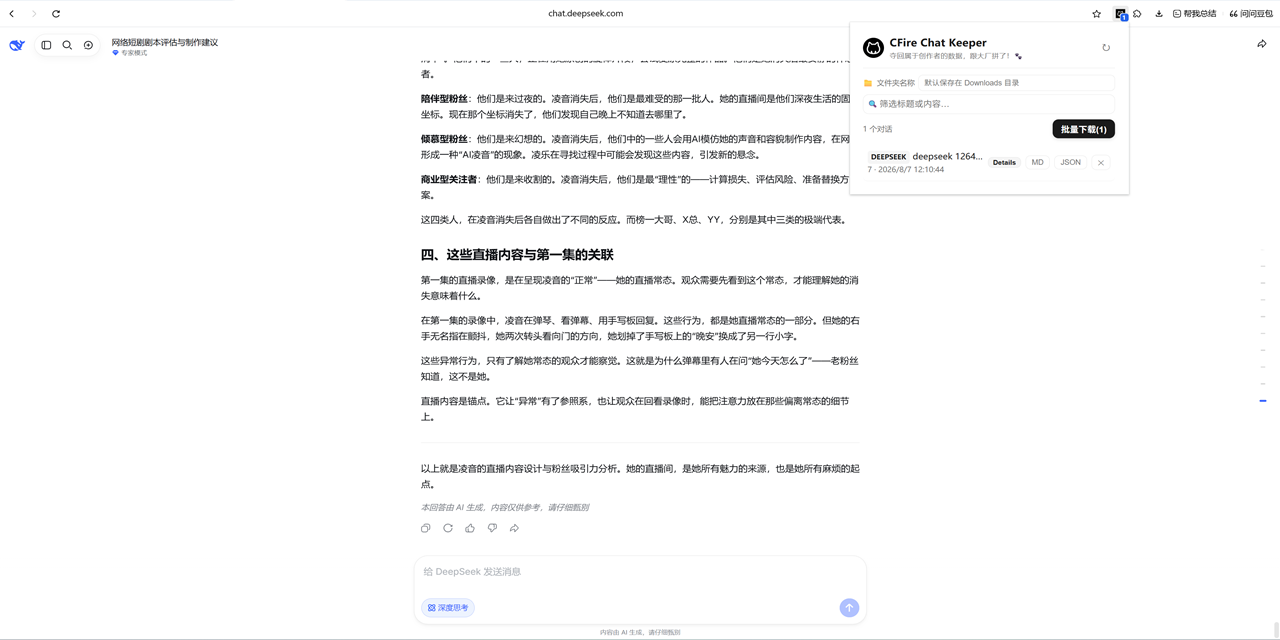
CFire Chat Keeper conversation selection screenshot

✨ Core Features

Everything you need to capture, organize and export your AI conversations.

📥

Batch Export

  • Markdown — ideal for reading and secondary editing
  • JSON — for programmatic processing and backup
  • One-click export of all conversations with custom save paths
🖼️

Image Extraction

  • Automatically identifies images in conversations
  • Selectively download the images you want
  • Saved into an images subdirectory
🔍

Smart Filtering

  • Real-time search through titles and content
  • Quickly locate historical conversations
  • Keyword filtering support
📁

Flexible Storage

  • Custom save path relative to Downloads
  • History shortcut for common directories
  • Automatic folder structure creation
🔄

Full History Retrieval

  • Auto-scrolls to load complete long conversations
  • Ensures no content is missed
  • Real-time progress display
🌍

Bilingual Interface

  • Auto-detects browser language
  • Chinese (Simplified / Traditional)
  • English for all other languages
🔒

Privacy by design — your data never leaves your device

All processing happens locally. No uploads, no tracking, no ads. Read the full privacy policy →

🚀 Installation

Install from the Chrome Web Store in one click — or manually from GitHub releases.

🧩

Install from Chrome Web Store (Recommended)

One-click install, automatic updates, no developer mode needed.

Add to Chrome
OR install manually from GitHub releases
Download the latest release zip from GitHub Releases and extract it to any directory.
Open Chrome and visit chrome://extensions/.
Enable Developer mode in the top-right corner.
Click Load unpacked and select the extracted folder.
Open DeepSeek, ChatGPT or Doubao — conversations are captured automatically. 🎉
Download Latest Release